

Obviously, the vehicle has been connected to the charging gun, but the dashboard does not show the “charging” prompt, and the charging pile screen jumps out of a line of cold “communication failure” code.
At that moment, a sense of anxiety came to my mind. Was the charging pile broken? Or was there something wrong with the car? After the maintenance engineer came to the door and tested it repeatedly, he finally found that it was just a loose stitch-the experience of “small problems and big battles”, which I believe many car owners and after-sales personnel have a deep understanding of.
Let’s thoroughly disassemble the troubleshooting logic of OBC (on-board charger) CAN communication fault. As a “translator” in the electric vehicle charging system, once the CAN-bus “strikes”, the dialogue between the whole vehicle and the charger will be interrupted instantaneously.
We will start from the source of the fault, follow the golden principle of “first the whole vehicle, then the whole machine, first the outside, then the inside”, and help you lock the problem step by step.
- Fault sources are divided into three parts.
Fault sources are divided into: vehicle harness, vehicle charging related controller (BMS/VCU) and charger.
Maintenance shall follow the principle of first complete vehicle, then complete machine, first external, then internal.
Vehicle side fault
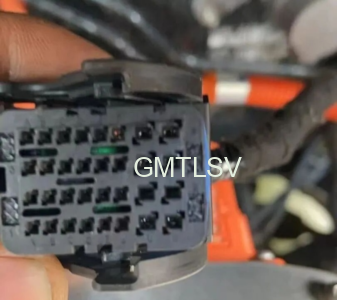
Low voltage harness connector problems: connector looseness, pin withdrawal, pin reversal, resulting in intermittent interruption of communication;
Vehicle charging associated controller is abnormal: BMS and VCU are faulty, and charging enable and charging interaction messages are not sent normally.
Determination: Use the CANtest device to capture the bus message and observe whether there is a BMS charging instruction. There is no message, the fault is at the vehicle end, and there is no need to disassemble the OBC.
Charger software fault
The hardware circuit is normal, but the communication function fails, mostly due to software problems:
Program task stuck, underlying logic BUG;
The CAN controller fails to be powered on and initialized, and works in an abnormal mode;
CAN transceiver SPI communication interaction is abnormal;
The message triggering conditions are not met: K15/30 power supply detection is abnormal, and the internal fault flag bit locks the message transmission.
Handling method: If the hardware detection is normal, you can try to rewrite the controller program for retest/or restart the retest after power off.
Charger hardware CAN circuit fault
The hardware is the high-frequency fault point of after-sales disassembly, which is divided into two circuits:
CAN circuit of external interface board: breakdown failure of CAN magnetic bead and TVS tube electrostatic protection device (lightning strike and external high and low voltage series current are most likely to be damaged);
Main board core CAN circuit: CAN transceiver chip is damaged, DSP master control is abnormal, and auxiliary power supply of CAN module is lost.
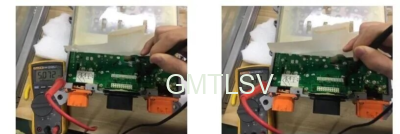
Actual measurement: measure the connection and disconnection of CAN-H and CAN-L lines in the power-off state; Power on to detect the power supply voltage of CAN chip.
Standardized after-sales troubleshooting sequence
Appearance inspection: check whether there is water, looseness or pin deformation in the low-voltage plug of the whole vehicle;
Message monitoring: connect CAN acquisition equipment and confirm whether BMS/VCU outputs charging interaction command;
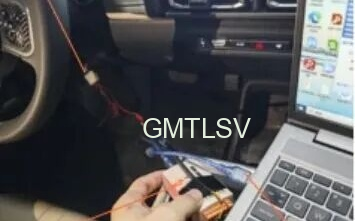
Boundary division: no message for the whole vehicle → repair the whole vehicle; The whole vehicle message is normal, and the OBC body is locked;
Hardware measurement: detect CAN port protection device, chip power supply and CAN bus voltage difference;
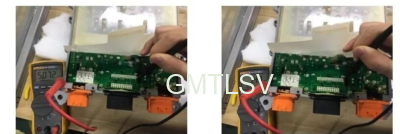
Software verification: if the hardware is normal, refresh the program to test the communication function.
Maintenance reminder
Do not replace the OBC directly as soon as the communication fault is reported. Half of the faults come from external nodes: poor contact of the vehicle harness connector;
For vehicles parked in rainy days and outdoors, the CAN interface shall be mainly inspected. External high and low voltage series current and electrostatic breakdown are typical hidden faults;
Intermittent communication fault is difficult to reappear in static state. Check the pin contact and power supply stability first, and verify whether it will reappear intermittently when driving on bad roads and bumpy roads.
Looking back on the whole investigation process, it is not difficult to find an interesting rule: communication failure is often not the problem of communication itself. Many times, the problem is hidden in those seemingly insignificant links-a loose wiring harness, a TVS tube broken down by static electricity, or even a procedural “stutter”.
This also reminds us that in the face of the general error signal of “communication failure”, we should not replace the OBC motherboard directly. Only by checking the message, external interface and power supply stability of the whole vehicle step by step, can we really find the focus while avoiding detours.
Finally, please remember a few key reminders: vehicles returning from rainy days should first check whether the CAN interface protection devices are in good condition; if there is an intermittent fault, it is advisable to drive the vehicle on a bumpy road to repeat the problem; For those “can not find the problem” of difficult and complicated diseases, a program refresh is often more effective than replacement.


